
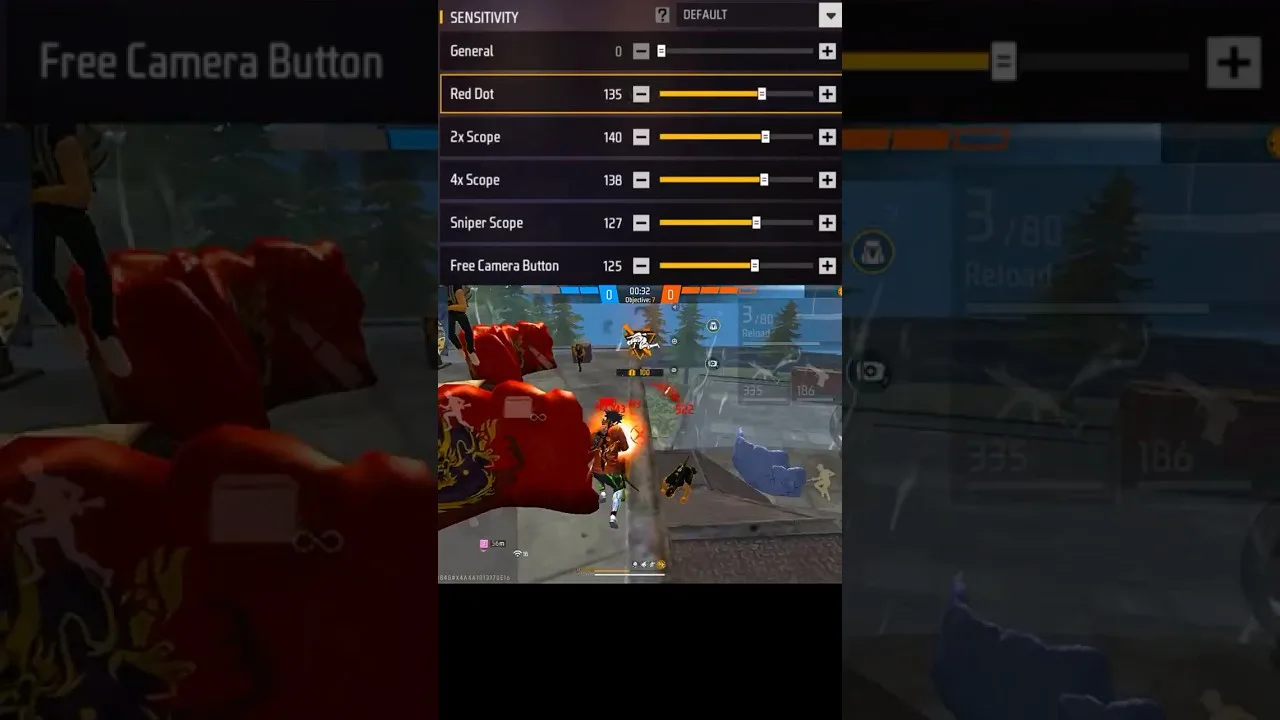
Six sliders, six different moments in a fight. The sensitivity screen in Panel Red sliders confuses new players mostly because the sliders look interchangeable when each actually governs a separate situation. This reference explains every one in plain language — what it controls, when you feel it, and how it relates to its neighbours — so your adjustments stop being guesses.
Keep this page open during your next tuning session; it is written to be used, not just read.
General Sensitivity
General governs camera and crosshair movement while you are not aiming down a scope — hip-fire, turning, tracking a moving opponent at close range, and the base feel of every drag. It is the foundation slider: most players tune it first, because every other setting is experienced relative to it.
If your close-range aim feels sluggish when an opponent strafes past, or wild when you try to hold a doorway, general is the slider speaking.
Red Dot Sensitivity
Red dot governs aim while using the red dot sight — the default aiming view for most close and mid-range fights, and the view in which deliberate drag headshots are performed. For many players this is the single most important slider after general.
Tune it after general, at the distances you actually fight. Its relationship to headshots is direct, and our headshot settings guide is built around this slider and its partner.
2x and 4x Scope Sensitivity
The 2x slider governs the low-magnification scope used for mid-range engagements; the 4x governs the stronger scope for deliberate longer shots. Magnification multiplies apparent movement, so scope values are usually set lower than general — the same thumb movement should produce a calmer crosshair movement when the world looks four times closer.
The dedicated treatment of scoped play — target size, recoil control at range, and when each scope earns its place — is our scope settings guide.
Sniper Scope and Free Look
Sniper scope sensitivity governs the highest magnifications, where breath-steady micro-adjustments matter and even small values feel dramatic. Free look is the odd one out: it controls the camera when you look around without turning your character — situational awareness, not aim — so it can be set by pure comfort without affecting a single shot.
Do not neglect free look just because it does not fire. The player who checks flanks smoothly and often survives fights the tuner of perfect scope settings never sees coming.
How the Sliders Interact
The sliders form a ladder: general sets the base, red dot refines close aim, scopes step down as magnification rises. Changing general after perfecting your scopes shifts the feel of everything, which is why the tuning order matters — foundation first, refinements after, one at a time.
When a fight feels wrong, diagnose by situation: hip-fire chaos is general, red-dot overshoot is the red dot slider, a scope that will not settle is that scope's value. Matching the symptom to the slider is the whole skill of tuning, and it is learnable in a week of honest testing.
Final Thoughts
Six sliders, six moments. Learn which moment each governs, tune in ladder order, and change one at a time. The screen stops being a puzzle and becomes what it was designed to be: a workbench for your aim.